AI chat for your Pinnacle parts: from question to enquiry or sale
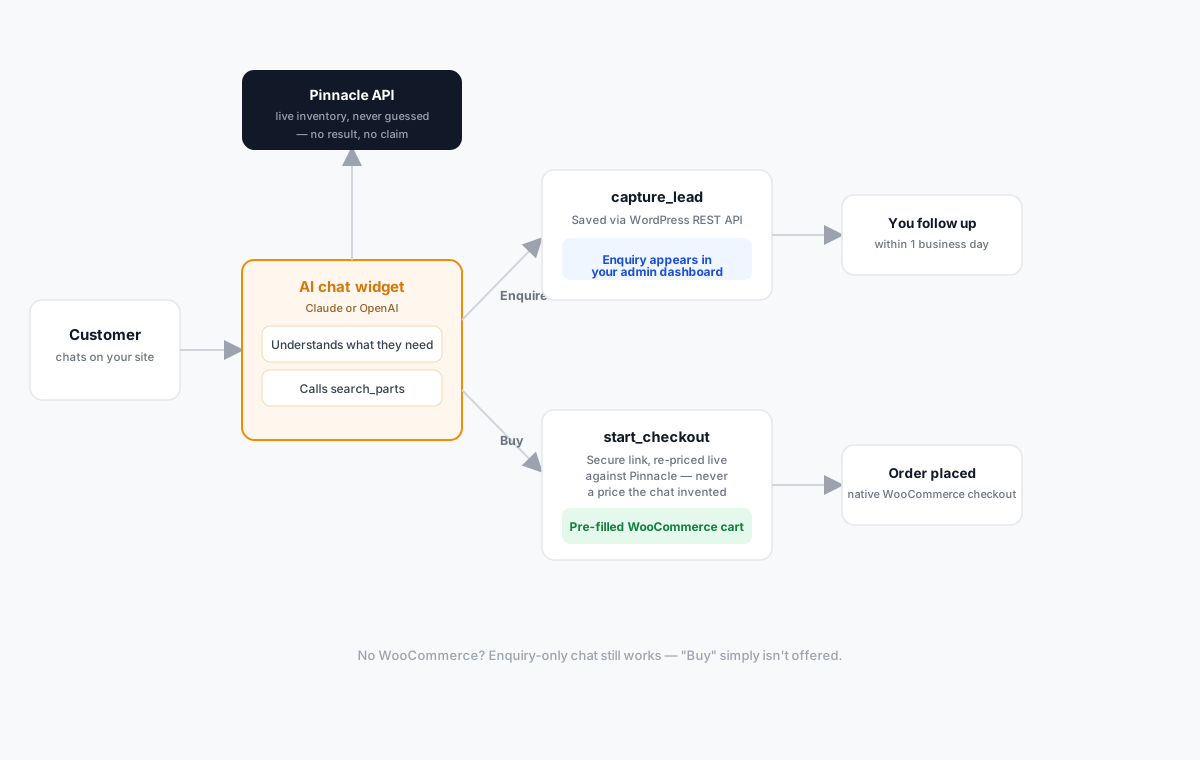
A chat widget that just talks isn't worth much to a parts business. Customers don't want conversation for its own sake — they want an answer to one specific question, usually some version of "do you have a 2018 Camry alternator?" The question that actually matters for whether a chatbot is useful here is: when that question comes in, does the bot guess, or does it check?
It never guesses
Before the chat says a part is available, or states a price, it calls search_parts against
the live Pinnacle API — the same inventory your website catalogue and your counter staff see. If
nothing comes back, it says so. It does not invent a stock number or a price to keep the
conversation moving, and it doesn't fall back to a generic "please call us" answer when it
actually could have checked and given a real one.
That distinction is the whole reason this is built on top of Pinnacle rather than as a general-purpose chatbot with a script. A script can be confidently wrong. A tool call against your real inventory can only ever be right or absent — and "I don't see that in stock right now" is a far more useful answer than a guess that costs you a refund and an unhappy customer later.
Two things it can do once it finds a part
Enquire. The chat collects a name, phone, and email, then saves a ready-to-work enquiry through the WordPress REST API. It shows up in your admin dashboard with the full conversation attached, so whoever follows up can see exactly what the customer asked for, without making the customer repeat themselves on a phone call. For a lot of parts businesses, this alone solves the real problem: after-hours questions that would otherwise just go unanswered until morning, or worse, get answered by a competitor first.
Buy. If you also have the WooCommerce catalogue, the chat can go further: it calls
start_checkout, which generates a secure, time-limited checkout link — re-priced against live
Pinnacle data at the moment it's created, never a number the chat itself decided or remembered
from earlier in the conversation. The customer taps a button, lands on your normal WooCommerce
checkout with their parts already in the cart, and picks their own delivery address and shipping
option there, exactly as if they'd navigated to the product page themselves.
You don't need the full catalogue to use this
If you don't want a WooCommerce storefront at all, the chat still works as an enquiry-only assistant — it searches, it answers questions, it captures leads. The only thing that changes is that "buy" isn't offered, because there's no checkout to hand off to. That's a deliberate split, not a missing feature: the chat's capabilities follow what you've actually got installed, so you only pay for and set up the tier that matches your business.
This matters for businesses that sell mostly offline — over the counter, by phone, through a trade account — and just want a faster, always-on way to answer "do you have this" without committing to running a full e-commerce storefront first.
Why this is different from "just add a chatbot"
A generic chatbot answers from a script written months before your inventory looked anything like it does today. This one answers from your real inventory, checked at the moment the question is asked, and when a customer is ready to act, it hands them to a real transaction — either a lead in your dashboard or an order in your checkout — rather than leaving them to re-type everything into a separate contact form and start over.
Frequently asked questions
Does the chat ever make up stock or pricing? No. Every availability or price answer comes from a live call to the Pinnacle API at the moment the question is asked. If there's no result, the chat says so rather than guessing.
Can customers actually complete a purchase in the chat window? The chat hands them a secure checkout link that opens your normal WooCommerce checkout with their parts already in the cart — the payment itself happens on your checkout, not inside the chat.
What if I don't have WooCommerce set up? The enquiry-only tier works without it — the chat searches and captures leads, and "buy" simply isn't offered.
Where do enquiries from the chat end up? In your admin dashboard, with the full conversation attached, the same place manually submitted enquiries land.
Curious whether this fits your site? See the two ways to add it.