How Pinnacle parts search becomes a real WooCommerce sale
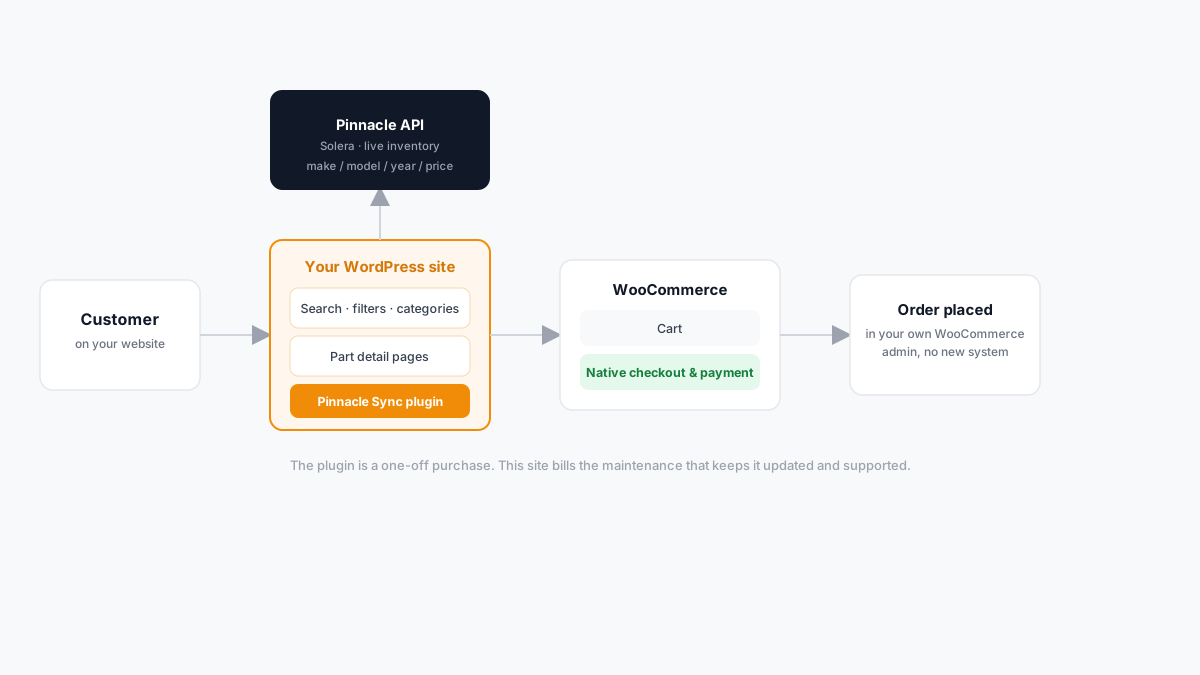
Most WooCommerce stores run on the default shop and product templates. For an auto-parts business, that's the wrong shape of page — nobody browses a used transmission or a wing mirror the way they browse a clothing store, by scrolling a generic grid and hoping the filters catch up. "Pinnacle Sync for WooCommerce" exists because of that mismatch, and it's worth walking through exactly what it does, step by step, rather than leaving it as a vague "integration."
What Pinnacle actually is
Pinnacle is parts-recycling and inventory software made by Solera — the same company behind Hollander, a name a lot of auto recyclers already know. If your business already runs on Pinnacle to manage stock, this plugin is what puts that same inventory in front of customers on your own website, instead of keeping it behind the counter where only staff can see it.
To be clear on scope: this is a plugin that connects to the Pinnacle account you already run. It isn't sold or endorsed by Solera, and there's no reseller agreement between us — it's built to work with the software the way any website connects to an API it has permission to use.
Why a generic WooCommerce store doesn't fit auto parts
Think about how a customer actually shops for a part. They don't start with a category page — they start with a vehicle: make, model, year, sometimes a sub-model or engine size. A standard WooCommerce product grid has no concept of any of that. Either someone manually tags every single product with every compatible vehicle (and keeps that current as stock turns over daily), or the store quietly becomes unusable the moment the catalogue grows past a few hundred parts.
Pinnacle already tracks that vehicle-fitment data as part of normal recycling-yard workflow. This plugin's job is to stop that data being locked inside a system only your staff can see, and put it in front of the customer in the shape they actually search in.
The flow, in order
- A customer searches your site. Make, model, year, category — filtered the way an auto-parts buyer actually thinks, not a generic product search box.
- The plugin calls the live Pinnacle API. This is the detail that matters most: nothing is cached or synced on a schedule. What the customer sees is what's actually in your yard right now. If a part sold five minutes ago at the counter, it doesn't show up as available on the website five minutes later — there's no stale copy of your inventory sitting in a database somewhere waiting to be out of date.
- Results render on custom pages. Category tiles, part detail pages with images, built specifically for parts — not WooCommerce's default shop template, which has no idea what "make/model/year" means and never will without this layer in front of it.
- The customer adds to cart and checks out. This is the part that's easy to undersell: checkout is your own WooCommerce checkout. No new payment processor, no second admin panel to log into, no separate order system to reconcile against your real one. The order lands exactly where your existing orders already land, with the same payment methods, the same shipping rules, and the same order emails your customers already expect.
What this actually changes day to day
The honest version of "what you get" isn't a dramatic transformation — it's removing a specific piece of friction. Before this plugin, a customer who wants to know if you have a part either calls, emails, or gives up and buys from whoever answers the phone first. After it, they can check themselves, at 11pm on a Sunday, against inventory that's actually accurate at that moment — and if it's there, they can pay for it without you lifting a phone.
That doesn't replace your counter staff or your phone line. It means the people answering your phone are talking to customers who already know what's in stock, instead of fielding "do you have X" calls that go nowhere because the part sold yesterday.
Two payments, not one subscription
The plugin itself is a one-time purchase, agreed and paid offline — it's not sold through a website cart. What's billed as an ongoing subscription is maintenance: updates when the Pinnacle API changes, support, and licence validation. That split matters for how you budget it: don't expect a recurring charge for the plugin itself, only for keeping it current and working.
Frequently asked questions
Do I need to already have a Pinnacle account? Yes — this plugin connects your WordPress site to the Pinnacle account you run today. It doesn't set Pinnacle up for you or replace it.
Does this replace WooCommerce? No. WooCommerce still handles your cart, checkout, payments, and order management exactly as it does now. This plugin only changes where the product data on those pages comes from.
What happens if my Pinnacle stock changes constantly? That's the point of calling the API live rather than syncing on a schedule — the website reflects your actual stock at the moment someone looks, not a snapshot from this morning.
Can I add eBay or the AI chat later? Yes — both are separate add-ons that build on the same Pinnacle connection, billed under the same subscription rather than as a new relationship.
Why this is worth reading before you enquire
If you're reading this because you searched for how a Pinnacle-to-WooCommerce integration actually behaves — that's the point of this post existing. A prospect who understands the shape of the system before they enquire asks better questions and makes a faster decision than one starting from "so what does this even do?"
Want to see it running on your own site? Enquire about setup.